

The R1 is SMSL’s first compact gaming oriented DAC/Amp, costing just 79 USD / €67 w/o tax.
MAIN FEATURES:
- INPUTS: Mic, USB, Coax, and Optical
- OUTPUTS: Headphone 3.5 and 4.4mm, Preamp RCA (volume controlled)
- CONTROLS: volume knob, EQ and mic sliders, selection buttons

ABOUT THE DESIGN
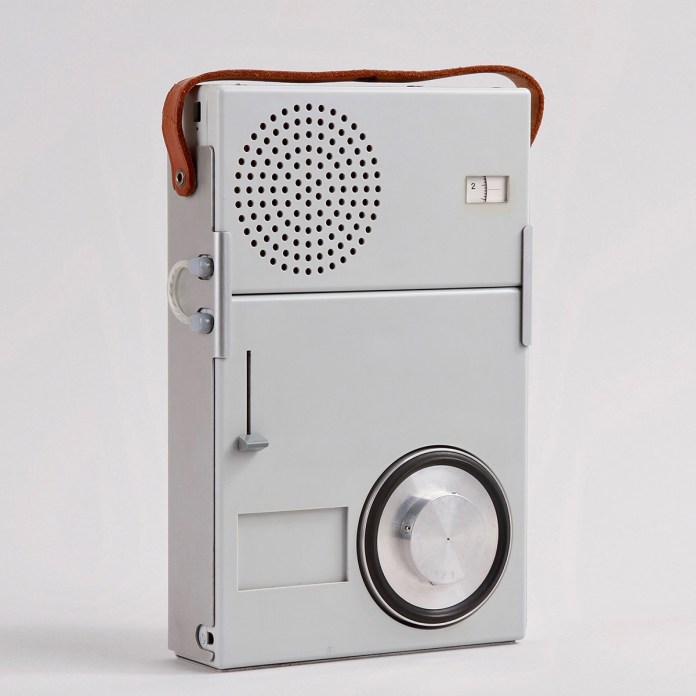
In my opinion, the design of this unit is remarkable. It reminds me of classic Braun audio equipment designed by Dieter Rams. It manages to be both functional and aesthetically pleasing, combining modern and timeless elements. I’m genuinely impressed and whoever was responsible for the design deserves credit for it.
Here’s an example of Dieter Rams’ design:
ABOUT SMSL
Established in 2009, SMSL is a well-known brand among audiophiles, particularly within the headphone community. The company introduced its first DAC in 2014 and gradually expanded into DAC/amps, headphone amplifiers, compact speaker amplifiers, and even a few speakers.
Like other well-regarded Chinese electronics brands such as Topping and Gustard, SMSL has increasingly focused on the international market in recent years, achieving notable success.
SMSL has a sub-brand called VMV, which they appear to use for their most exclusive products.
SMSL R1 SPECIFICATIONS
- Inputs: USB, Optical, Coaxial, mic, optional extra USB power
- Output: 3.5mm Headphones, 4.4mm Headphones, Line out
- Line output level: 1.5Vrms
- THD+N (non-Weighted): 0.009% (-80dB)
- Dynamic range (non-Weighted): 98dB
- SNR (non-Weighted): 98dB
- Resolution: 95dB
- Headphone output power: 120mW @ 32 ohm
- Treble and bass adjustment range: -9dB~+9dB
- Size: 76X34.6X143.8mm / 2.99X1.36X5.66 in (WxHxD)
- Weight: 316.4g/0.698lbs
- Available colours: Silver or black
IN THE BOX
- USB C cable with USB A adapter
- Mic/headphone Y cable
Disclaimer: The review unit was provided for the purpose of this review by Aoshida Audio.
- Manual: SMSL R1 Manual
Current price and availability:
- Aoshida Audio: SMSL R1
BUILD AND FUNCTIONALITY
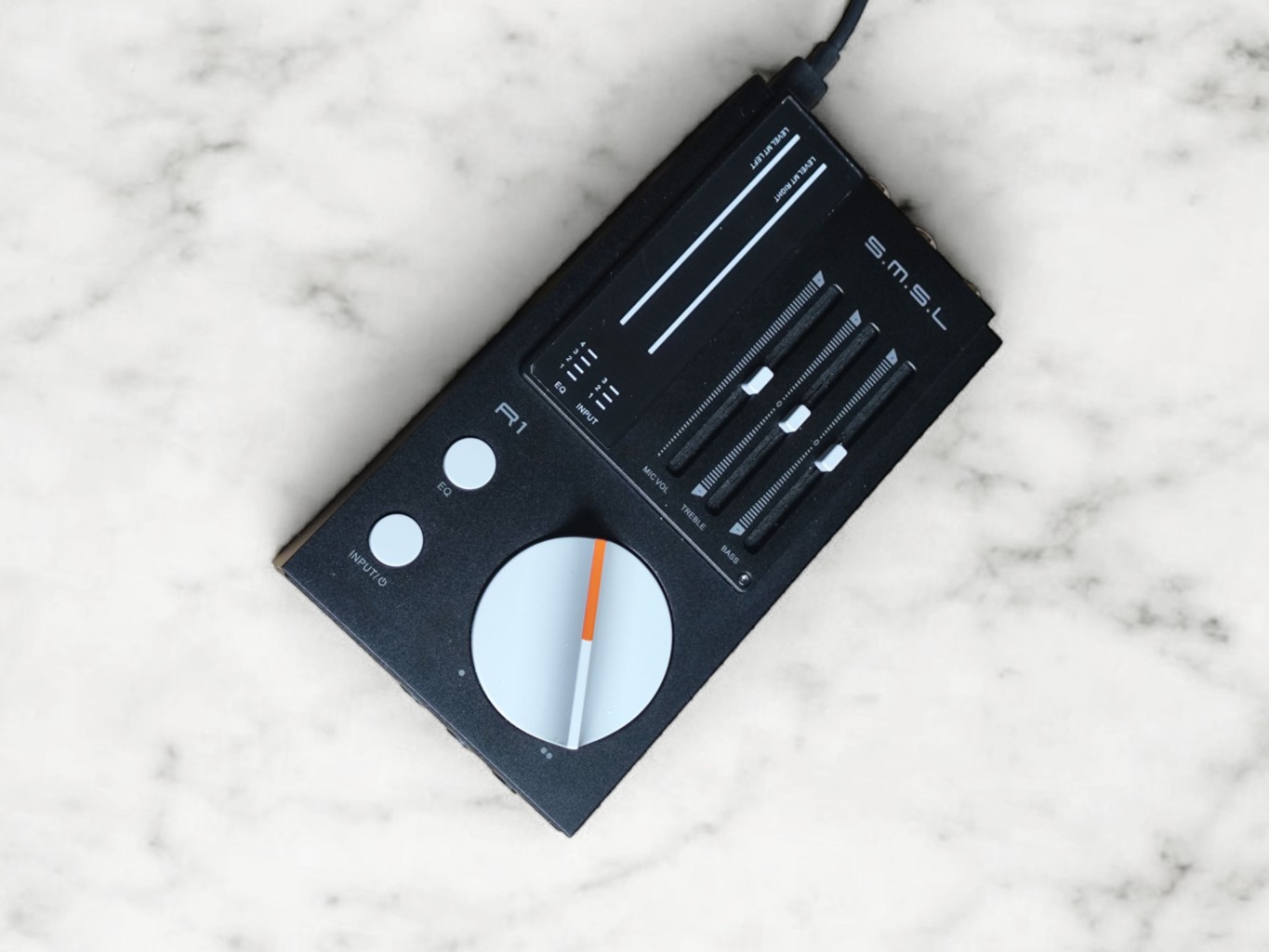
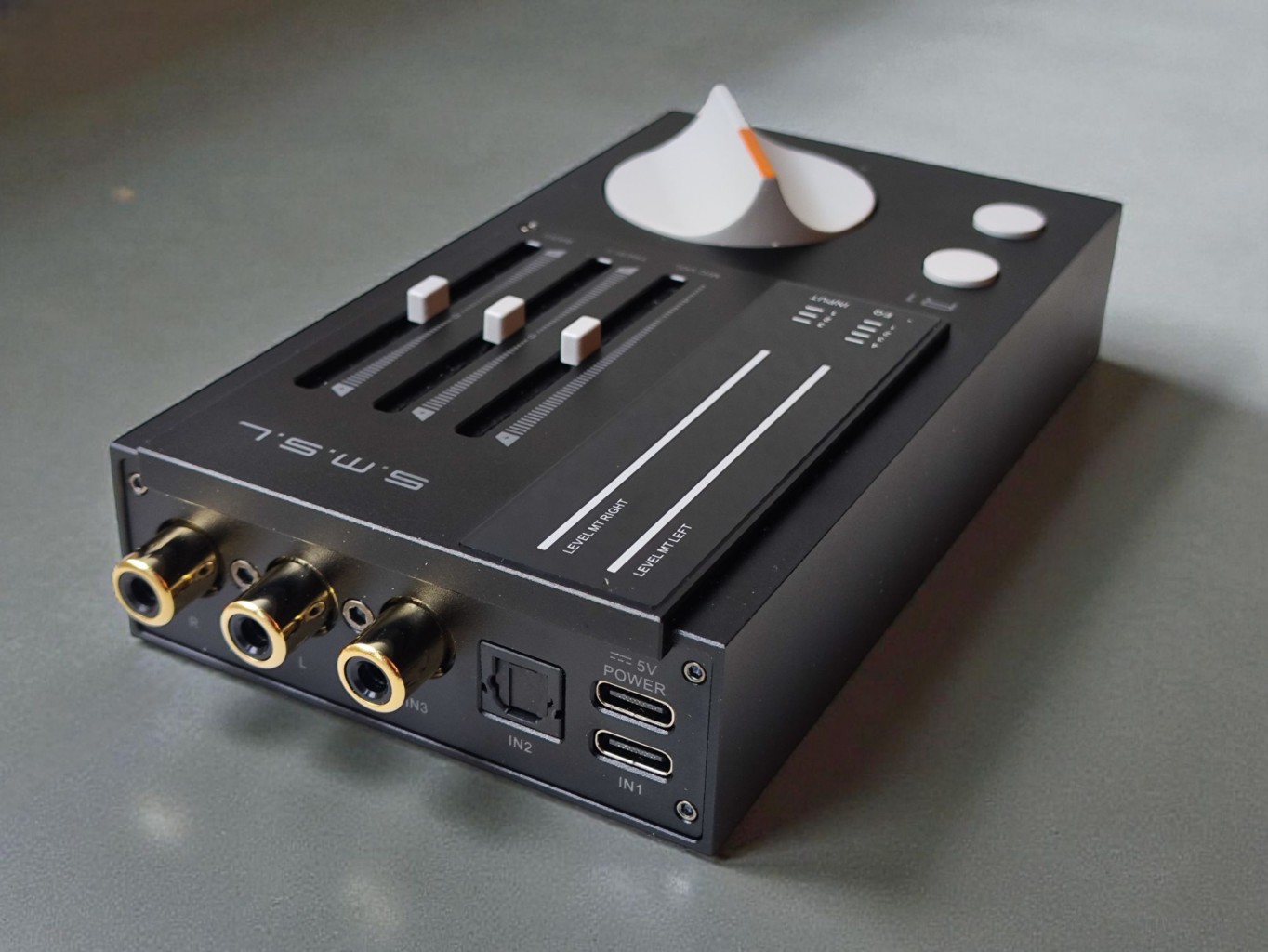
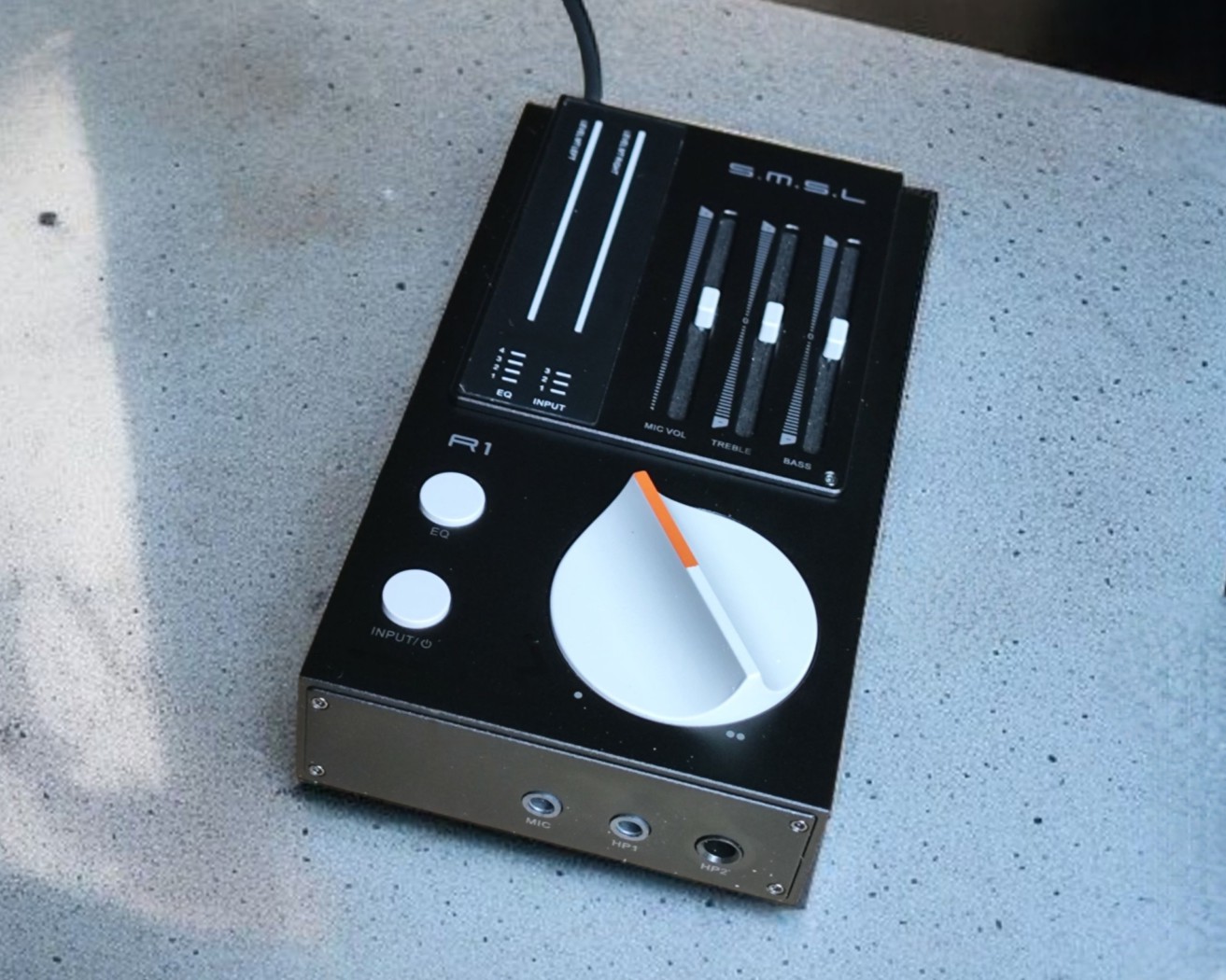
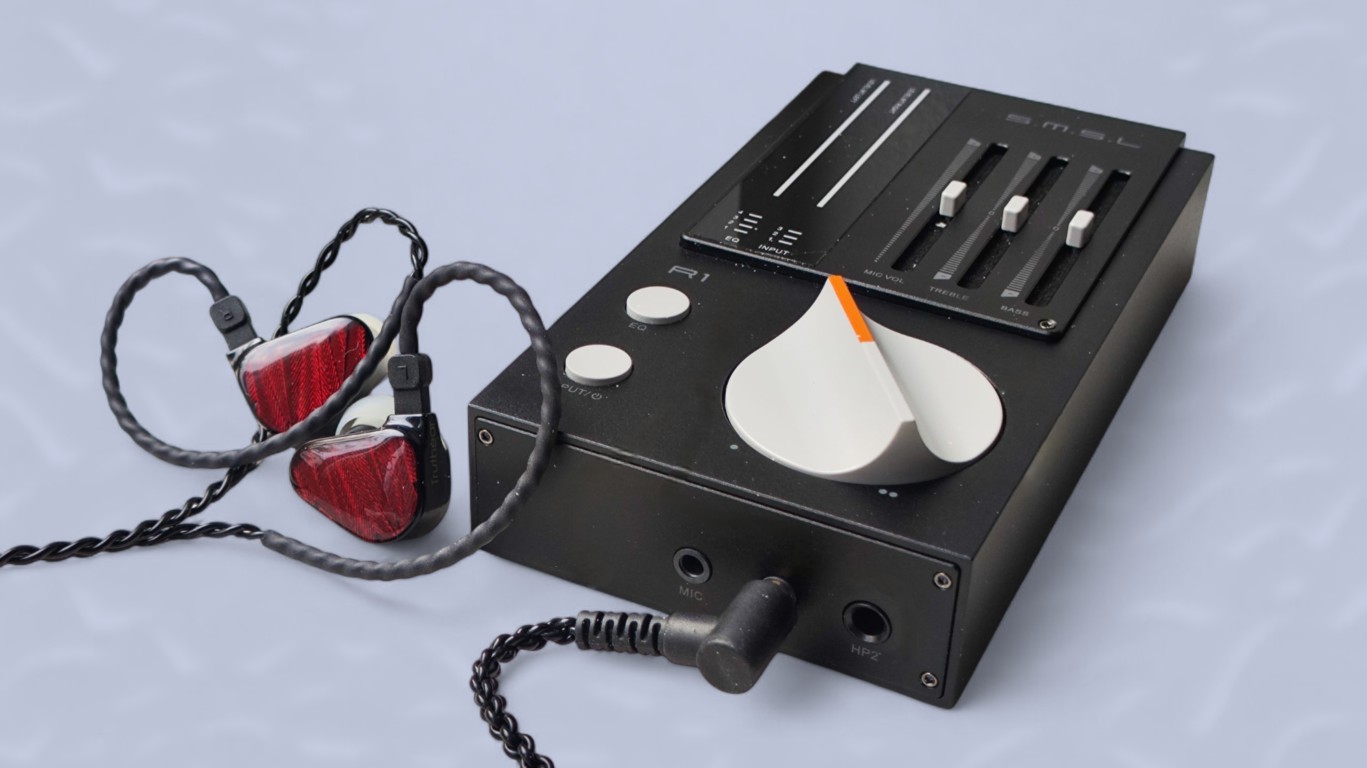
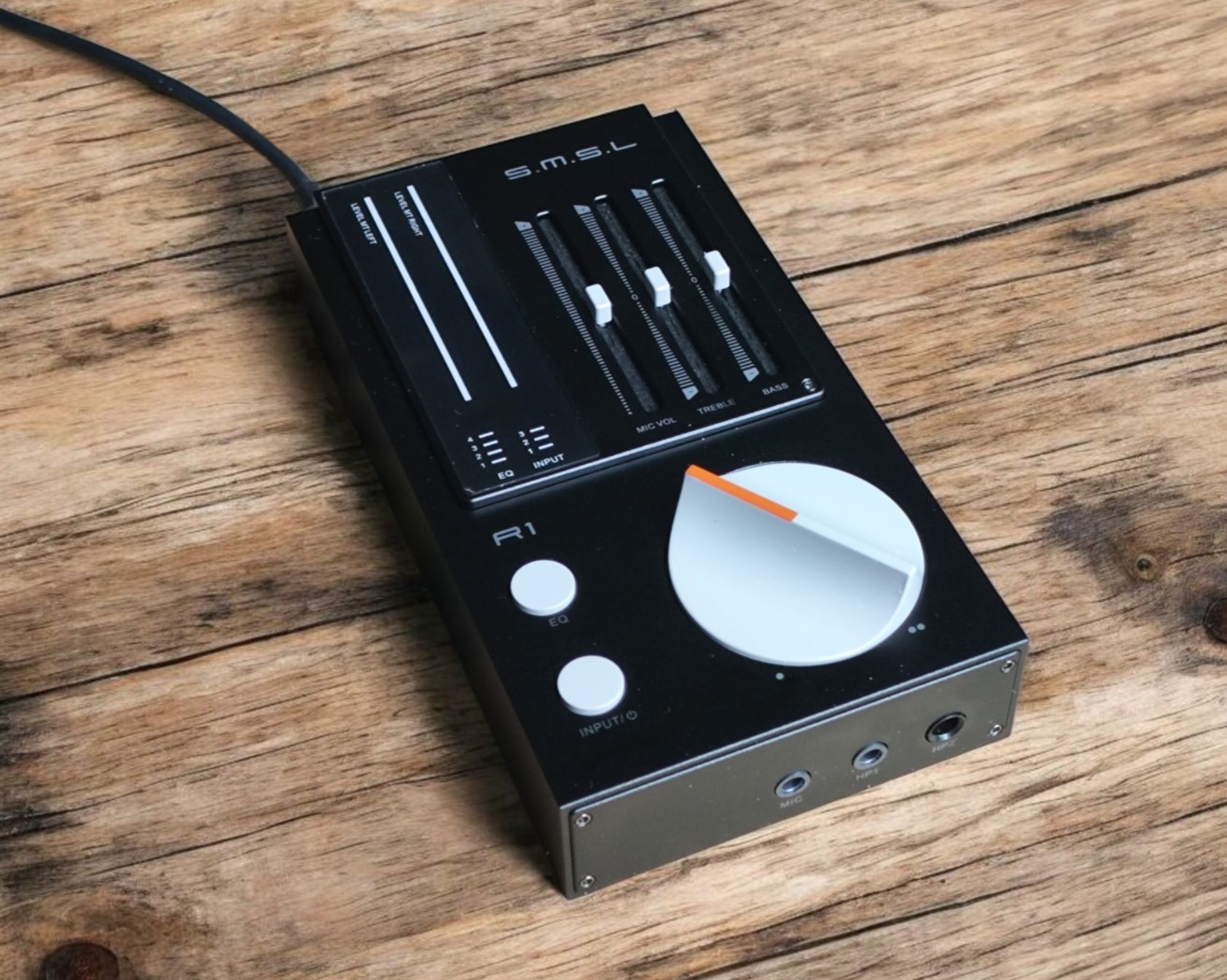
The R1 is compact and lightweight, measuring roughly 8 by 14 cm and weighing around 300 grams. It’s a well-designed little device with all controls conveniently placed on the top.
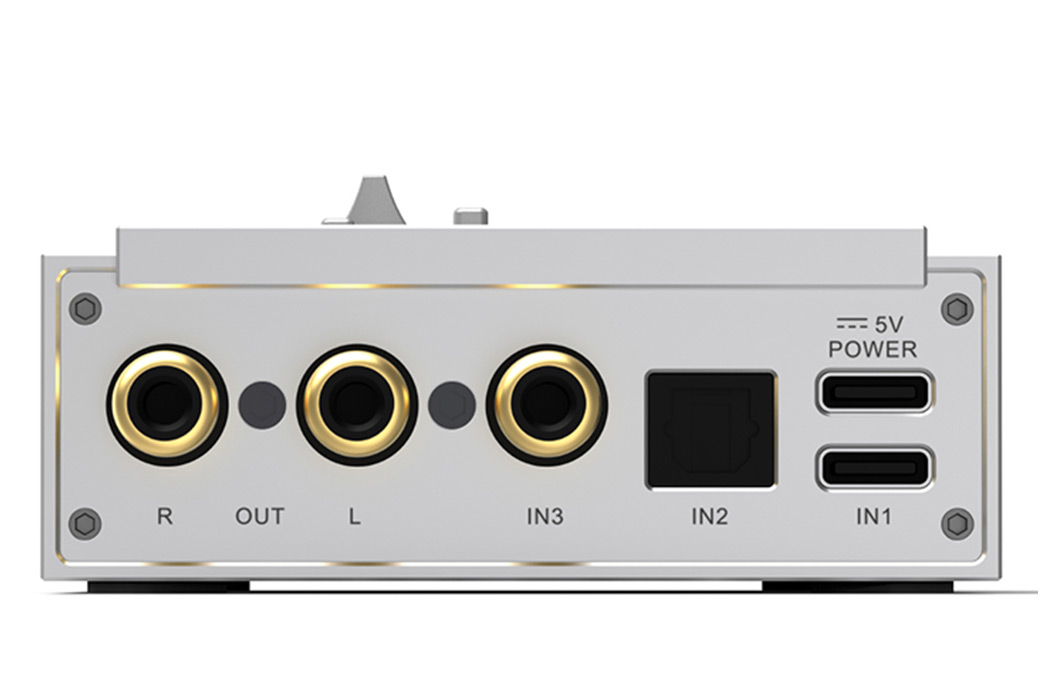
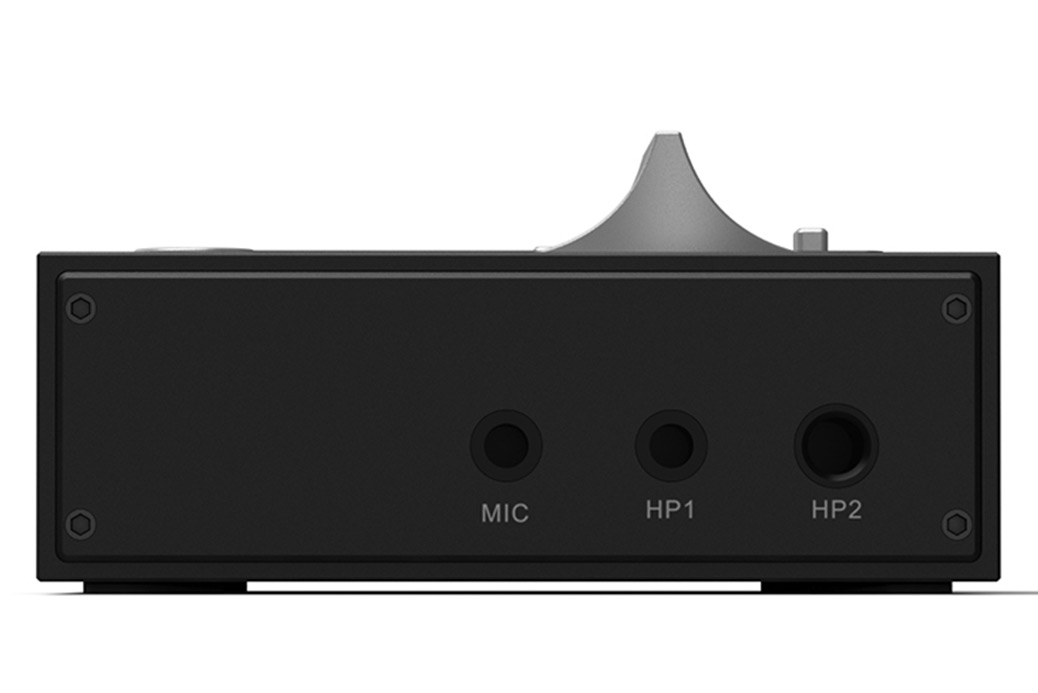
Headphone outputs (3.5 mm and 4.4 mm) and the microphone input are located on the front, while the USB, optical, and coaxial inputs are on the back. It also features preamp RCA outputs, which are automatically muted when headphones are connected.
In addition, there is a second USB port on the back dedicated solely to power. This can be useful when using a smartphone as the source or when connecting an external power supply for improved performance. When connecting the R1 to a computer, only the main USB port is needed, as it handles both power and signal.
As mentioned, I’m very enthusiastic about the design of the R1. It’s not only aesthetically pleasing but also highly practical. I especially appreciate the tactile layout — for example, the volume knob is designed so you can tell its position without even looking, thanks to its raised-center-edge shape. The EQ sliders also provide clear tactile feedback at the zero point, making it easy to feel their positions by touch alone.
The only feature I might miss is a dedicated mute button/function for the microphone input. It could be practical for many users – even though there are other ways to mute. I’ll come back to this later.
OPERATION
To power the device on and off you long press the input selection button.
CONNECTION
Connecting the R1 to my Windows computer worked flawlessly, with no driver installation required. I simply used a USB cable connected to the R1’s standard USB port (not the power port).
I also connected the R1 to my Android phone, using the standard USB port for the phone (signal) and the USB power port for an external power supply, as the phone alone could not provide enough power to run the unit.
INPUT SELECTION
There is a dedicated button to switch between inputs, with small indicator lights showing the selected source: USB, coax, or optical.
EQ
The R1 features four (or more correctly three) EQ presets, which can be selected using a second dedicated button. Like the input selector, small indicator lights show which preset is active.
EQ-1 is basically no EQ. It’s the standard, flat preset. I would prefer if this were easier to identify, for example by having the light turn off when the EQ is flat (which also would leave room for another preset).
In addition to the presets, you can adjust treble and bass separately using the two sleek sliders. The sliders provide tactile feedback when centered, which is very practical and the way it should be.
MICROPHONE
The third slider controls the microphone volume. There is a dedicated mic input, and if you are using a headset with a built-in mic and a single 4-pole 3.5 mm cable, you need to use the included Y-adapter, as the 3.5mm headphone input does not support combination mic/headphone cables.
As mentioned, there is no dedicated mute button or function. To mute the microphone via the R1, you must slide the mic volume to zero, which isn’t ideal since the slider has friction and could wear out with heavy use.
Dedicated mute buttons are not a given on devices like this, but it would be a welcome addition. The Fosi K7 which I reviewed earlier this year e.g. has mute functionality by short pressing the volume wheel. I’d think SMSL could easily incorporate a mute functionality on the R1 by making the EQ button double as a mute button: Short press to mute and long press to change EQ setting.
That said, many microphones have their own mute button and there’s always software controls that can be used, including keyboard shortcuts.
LISTENING IMPRESSIONS
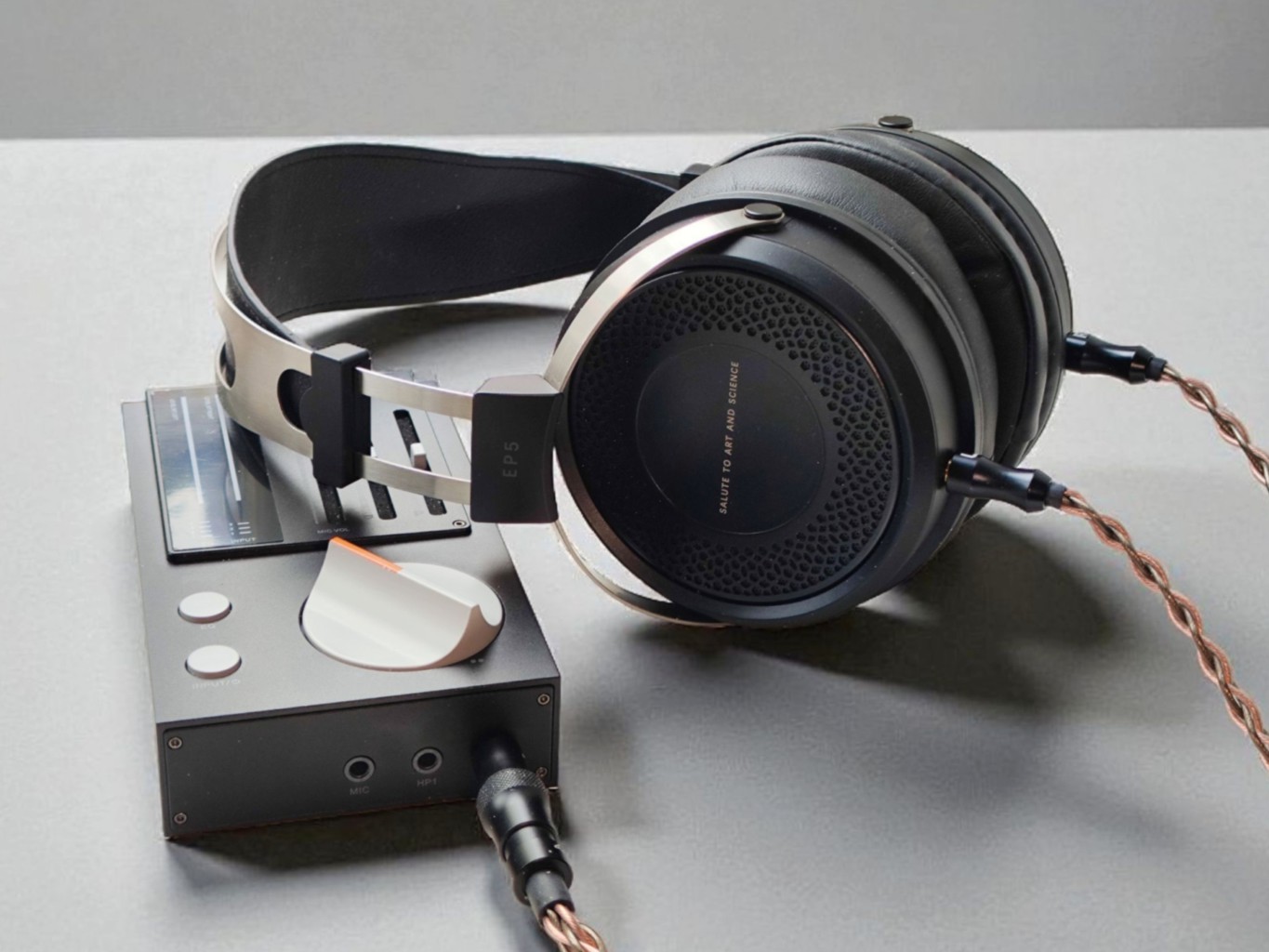
In the following I will test a range of headphones and IEMs to see how the R1 performs. For practical reasons I am using my Android phone as the source via USB, powered by an external USB supply. My playlist consists of tracks I know well across all major genres.
I have listed the impedance, sensitivity in dB/mW and/or dB/V (these are not the same numbers – dB/V is always higher), the typical price at the time of writing, and an indicator of the volume level used during listening.
HEADPHONES
FIIO FT13
- Closed-back dynamic
- Impedance 32 Ohms
- Sensitivity of 98 dB/mW
- Typical price: 329 USD
I start out with the most expensive headphones in the test, the new FiiO FT13. Using the 4.4 mm output, the R1 performs very well. The sound is powerful, punchy, detailed and pleasant. It delivers exactly what the FT13 is meant to offer. I go through all four EQ presets with every track, and they all work well without sounding extreme, even though I usually prefer the neutral/flat mode 1.
Listening volume is typically around 50 %.
- Amazon: FT13
FiiO FT1
- Closed-back dynamic
- Impedance of 32 Ohms
- Sensitivity of 98 dB/mW
- Typical price: 165 USD
FT13’s less expensive sibling, the FT1, also works very well with the R1. Going through my playlist, I find nothing negative to note. The FT1 is technically very close to the FT13 with a very similar driver, so it is no surprise that it performs equally well. As with the FT13, the EQ presets work nicely, and the manual EQ sliders do too, but I generally prefer the neutral EQ-1 mode.
Volume is typically around 50 %.
- Amazon: FT1
HIFIMAN XS
- Open-back planar
- Impedance 18 Ohms
- Sensitivity 92dB/mW
- Typical price: 239 USD
The XS is known for its expansive soundstage, and it works ok here. However, it can be demanding on the amplifier to maintain full control, and it can become a bit bright, so adjusting the treble EQ was helpful during longer sessions.
I still experienced some listener fatigue, which often happens when the headphones are underpowered.
I need to set the volume noticeably higher than with the previous two headphones, sometimes close to maximum during quiet passages. It is not the best match, but it works.
Volume typically sits between 60 and 90 %.
- Amazon: Hifiman XS
HIFIMAN SUNDARA
- Open-back planar
- Impedance: 32Ω
- Sensitivity: 92 dB/mW
- Typical price: 229 USD.
The Sundara is better than the XS, it’s not as bright. However, it still needs more power to sound its best.
Volume is typically at 70- 100%.
- Amazon: Sundara
SENNHEISER HD560S
- Open-back dynamic
- Impedance 120 Ohms
- Sensitivity of 110 dB/V (~100 dB/mW)
- Typical price: 160-260 USD
This headphone works very well with the R1. Sweet and warm, punchy, nice soundstage, non fatiguing, great detail.
Volume is typically at 50-70%.
- Amazon: HD560S
SENNHEISER HD600
- Open-back dynamic
- Impedance: 300 ohms
- Sensitivity 97 dB/mW
- Typical price 300 USD
The Sennheiser HD 600 also works well with the R1 and I see no reason not to be happy with this combination.
Typical volume 60-75 %
- Amazon: HD600
SIMGOT EP5
- Closed-back dynamic
- Impedance: 32 Ohms
- Sensitivity: 113 dB/V (~98 dB/mW)
- Price: 98 USD
I reviewed the EP5 earlier this year, and it is an excellent budget-friendly option. It has a slightly warm and intimate sound, not unlike the Sennheiser above. It works exceptionally well with the R1.
Typical volume: 40 to 60 percent.
- Linsoul: Simgot EP5
KIWI EARS ALTRUVA
- Open-back dynamic
- Impedance: 32 Ohms
- Sensitivity: 98 dB/mW
- Price: 69 USD
I will be reviewing the Altruva soon, but it is already clear that it offers impressive performance for under 70 USD. The sound is smooth and warm. It pairs well with the R1, quite similar to the Simgot EP5, although I prefer the EP5. The Altruva is also very comfortable.
Typical volume: 40 to 60 %.
- Linsoul: Altruva
AUDIO TECHNICA ATH-M50X
- Open-back dynamic
- Impedance: 38 Ohms
- Sensitivity: 99 dB/mW
- Price: 169 USD
This may be one of the most popular headphones in the world, which is no surprise given its solid performance and practical, utilitarian design. It features a single-sided detachable cable. Unfortunately, there is an audible hiss whether I use an external charger or my computer for power, and for this reason, I cannot recommend the ATH-M50X with the R1.
- Amazon: ATH-M50X
IN-EARS / IEMs
SIMGOT EM6L Gaming Headphones
- Impedance: 26 Ohms
- Sensitivity: 119 dB/V
- Price: 125 USD
These are great IEMs that work very well with the R1. There is a slight background hiss, which may depend on the power supply used. It doesn’t bother me, at least. It is nice to have the option to EQ down the bass.
Typical volume 40-55%.
- Price on Linsoul: Simgot EM6L
KIWI EARS CANTA
- Impedance: 14 Ohms
- Sensitivity: 104 dB/mW
- Price: 89 USD
Works well, but a very slight hiss as with the EM6L above.
Typical volume 40-55%.
- Linsoul: Kiwi Ears Canta
LETSHUOER S12 Ultra
- Impedance: 16 Ohms
- Sensitivity: 101 dB/mW
- Price: 169 USD
A great match, with no audible hiss from these IEMs; they are more demanding to drive than the ones mentioned above.
Typical volume 50-60%.
- Amazon: S12 Ultra
KIWI EARS CADENZA
- Impedance: 32 Ohms
- Sensitivity: 110 dB/mW
- Price: 35 USD
Excellent IEM, but too sensitive. The hiss is above my tolerance threshold and I can’t recommend it.
- Linsoul: Kiwi Cadenza
TRUTHEAR x Crinacle ZERO RED
- Impedans 17.5 Ohms
- Sensitivity: 117.5 dB/V
- Price: 62 USD
My favourite so far: No hiss, excellent well-balanced sound. The ZeroRED are a bit large for some users, but otherwise this is a no brainer for the R1.
- Amazon: ZERO:RED
CONCLUDING ON HEADPHONES AND IEMs
Although all the headphones tested sounded pretty good with the SMSL R1, some performed better than others. From the specifications, it was not surprising that the planar magnetics did not sound their best, as they typically require a lot of power. The other headphones performed consistently well, except for the ATH-M50X, which has audible background hiss.
For closed-back headphones, I would recommend the Simgot EP5 or the FiiO FT1. For open-back headphones, the Sennheiser HD560S performs very well, and the Kiwi Ears Altruva is a nice budget-friendly alternative.
Except for the ATH-M50X, there was no noticeable hiss with the headphones. With IEMs, however, the situation can vary. The level of hiss may depend on the power supply used. I tested with my PC and a a quality phone charger that works well with similar devices – e.g., Sound Blaster G8.
My preferred IEMs were the Letshuoer S12 Ultra and the Truthear Zero:Red. Both are excellent-sounding matches with no issues of hiss, and I can recommend either for use with the R1.
CONCLUSION
The SMSL R1 impresses with its sleek, well-thought-out design and physical controls. The EQ presets work effectively, and the sliders and volume knob, with its raised center edge, make operation intuitive and tactile. The discreet VU meter lights provide clear visual feedback.
As an entry-level unit, it performs well with most dynamic headphones, though planar magnetics feel slightly underpowered. Background hiss is generally not an issue, except with very sensitive IEMs or the ATH-M50X headphones.
Overall, the R1 delivers superb design, strong functionality, and excellent value for its price when paired with compatible earphones.
Thanks for reading. You can support us by purchasing anything using any of our affiliate links.
- Aoshida Audio: SMSL R1
Any purchase you make on Amazon or Linsoul with any of our affiliate links will give us a small provision at no cost to you.
We only get a provision for items that are not returned, so there’s no incentive for us to recommend something that’s not good.
Linsoul : Headphones, Earbuds, Wireless Earbuds, Desktop DAC/AMP, Portable DAC/AMP, Digital Audio Players,
Amazon: Headphones, IEMs, Headphone Amplifiers, Home Audio or Anything else.
.
If you enjoyed this article or other content on The Headphoneer, you might consider leaving a small donation to keep this website up and running. No donation is too small. Thanks for supporting us!

If you like our work please follow us on Instagram, Facebook and Twitter , it will help us grow. Sharing is caring 🙂